Submission Reference
Everything you need for App Store Connect and Google Play Console: metadata, descriptions, privacy labels, and preview video script. Copy and paste directly into the store dashboards.
ASO Metadata
App Store (iOS)
App Name (30 chars max)
Soar90: 90-Day Onboarding Plan
Subtitle (30 chars max)
Your first 90 days, mapped
Promotional Text (170 chars max)
Your first 90 days, mapped. Get a proven 30-60-90 day plan, win log, and Review-Ready Report for your new role.
Keywords (100 chars max, comma-separated, no spaces after commas)
onboarding,new job,30-60-90,90 day plan,career,onboarding checklist,first 90 days,performance review,new hire
Categories
Primary: Business - Secondary: Productivity
Google Play (Android)
App Name (30 chars max)
Soar90: 90-Day Plan
Short Description (80 chars max)
Self-guided onboarding with win log, check-ins, and Review-Ready Report.
Categories
Business - Productivity
Full Store Description
App Store and Google Play (4,000 chars max)
Starting a new job can feel like arriving in a room where everyone got the memo except you.
Most new hires feel overwhelmed in their first three months. Too much to learn, too many people to meet, and no clear way to know if you are on track. Soar90 fixes that with a structured roadmap, daily focus, and a way to capture every win along the way.
WHAT YOU GET
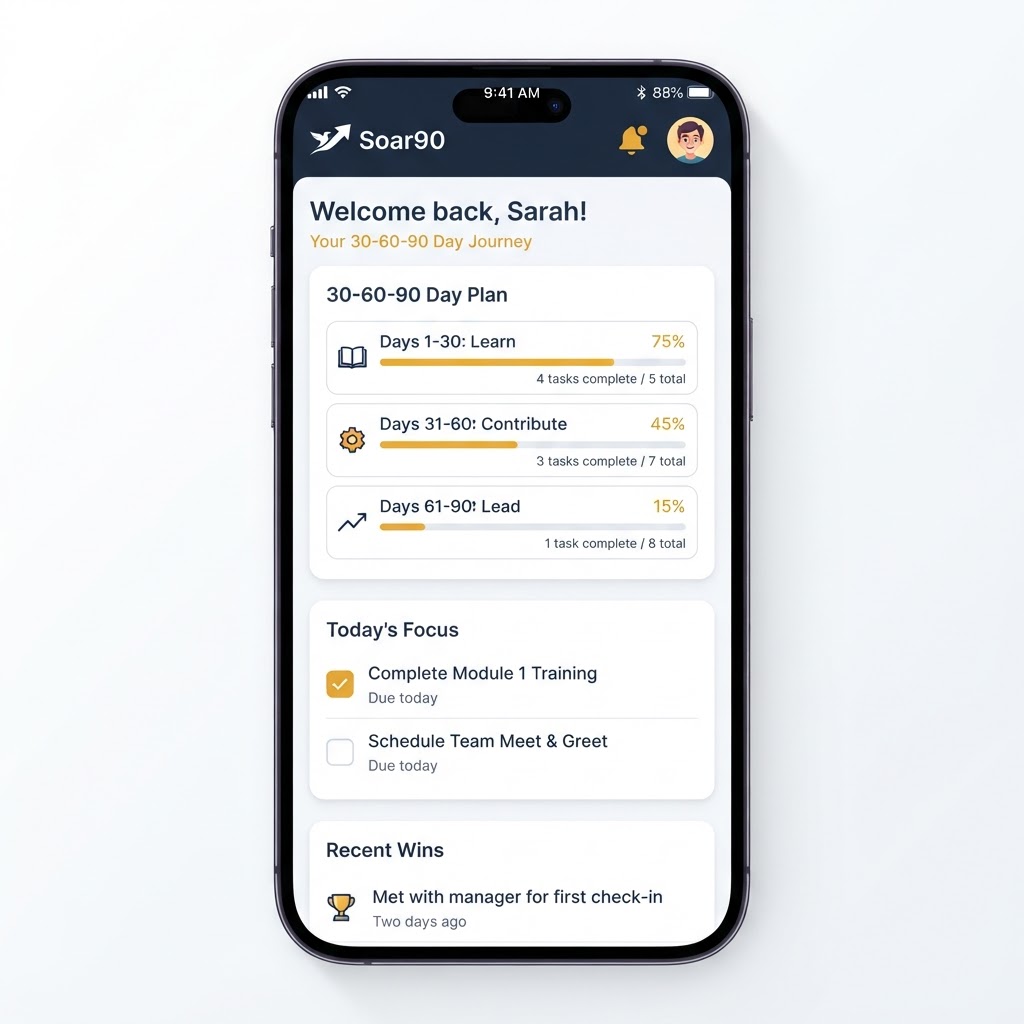
A guided onboarding plan with three phases:
- Days 1-30: Learn, listen, and orient. Build relationships, understand systems, and map the culture.
- Days 31-60: Contribute and connect. Take on real work, align with your manager, and deliver your first quick win.
- Days 61-90: Lead and grow. Think strategically, build your network, and prepare for your 90-day review.
KEY FEATURES
Pre-built task lists: Over 40 practical activities across your first 90 days, organized by category and week. Check them off as you go. No deadlines, no pass or fail.
Win Log: Document your accomplishments, positive feedback, and standout moments as they happen. When your review arrives, you show up with a complete record of your impact.
Shout-Outs: Capture the praise and recognition you receive from colleagues. Never forget a "great job" again.
Weekly Check-Ins: Rate your clarity, support, energy, and overall experience each week. Spot issues early before they become problems.
Review-Ready Report: Build a professional summary of everything you accomplished. Written in first person, ready to bring to your performance review.
Reflection Prompts: Each phase includes a guided reflection to help you capture lessons and set intentions.
Daily and weekly email reminders: Stay on track without nagging. Choose daily, three times a week, or no emails at all.
WHO IT IS FOR
Soar90 is for anyone starting a new role: new job at a new company, internal promotion, career change, or first management position. If you want to make a strong first impression and build momentum in your first 90 days, this is for you.
WHY IT WORKS
The 30-60-90 day plan is a widely used framework for structured onboarding. Soar90 makes it accessible, personal, and actionable. No theory, no fluff. Just clear steps and a system that keeps you on track.
PRIVACY
Your data is yours. We do not sell your information, show ads, or track you across other apps. Everything you log stays in your account, and you can export or delete it anytime.
ONE-TIME PURCHASE
Soar90 is a one-time purchase. No subscription, no recurring charges. Buy it once and use it for every new role you take on.
Need help? Visit the in-app Settings page to contact support.
Preview Video Script (30 seconds)
Open on the dashboard. Show the greeting, day counter, and three phase cards.
0:05-0:10Tap into a phase. Show tasks being checked off with the progress bar filling.
0:10-0:15Switch to Win Log. Add a win quickly, show the entry appearing in the list.
0:15-0:22Jump to the Review-Ready Report page. Show the report generating and the result.
0:22-0:30Final shot: the report on screen with "Soar90: Your first 90 days" text overlay.
Technical requirements:
- Duration: 15-30 seconds (Apple), 30 seconds recommended (Google Play)
- Format: H.264 or ProRes 422 (Apple), MP4 (Google Play)
- Resolution: Match device screenshot size (1320x2868 for iPhone)
- Content: Must be actual in-app footage, no marketing renders
- Google Play hosts on YouTube, provide the video URL
Privacy Nutrition Labels
Apple App Store Privacy Nutrition Label declarations. Fill these out in App Store Connect under App Privacy.
Data Collected
Contact Info - Email
Used for: Account registration, email reminders
User Content - Career data (tasks, wins, reflections)
Used for: App functionality, personalized plan
Data Not Collected
Key Declarations
Google Play Data Safety
Data sharing: No
Data encryption in transit: Yes
Data deletion request: Yes (via in-app Settings)
Account data: Email (for registration and reminders)
User-created content: Tasks, wins, shout-outs, reflections (stored to user account)
Accessibility Notes
Apple App Store Accessibility Notes. Paste this into the Accessibility Notes field in App Store Connect under App Information.
Accessibility Notes (App Store Connect)
Soar90 is designed to be usable by everyone, including users with disabilities.
Screen Reader Support
All interactive elements, buttons, and form fields are labeled with descriptive accessibility traits so VoiceOver users can navigate the full app, including the dashboard, task lists, win log, check-ins, and the Review-Ready Report.
Large Text and Dynamic Type
The app respects the system text size settings. Text scales up for users who need larger fonts for readability.
Color Contrast
Text and interactive elements meet WCAG 2.1 AA contrast ratios against their backgrounds for clear legibility in both light and dark mode.
Keyboard and Focus Support
Visible focus indicators appear when navigating by keyboard. All controls are reachable and operable without a mouse.
Reduced Motion
Animations and transitions are subtle and do not interfere with usability. No content relies on motion alone to convey meaning.
Tap Targets
Buttons and interactive controls meet the recommended minimum tap target size of 44x44 points for comfortable touch interaction.
No Time Constraints
All tasks, check-ins, and reflections can be completed at the user's own pace. There are no time limits or auto-advancing screens.
Google Play Accessibility Notes
Soar90 supports TalkBack screen reader navigation, large text settings, and high-contrast color schemes. All interactive elements meet minimum touch target sizes. No time-limited interactions. The app works with both light and dark mode.
Base44 App Store Scan
Before submitting, run the Base44 app scan to catch any issues:
- In the app editor, click Publish (top-right)
- Click the Mobile app tab
- Click Check Your App then Run App Scan
- Select App Store guidelines or Google Play guidelines
- Use Apply with AI or Copy Fix Prompt to resolve any flagged issues
After the scan is clean, click Build Store Files to generate your IPA (iOS) or AAB (Android) for submission.
Need screenshots?
Generate clean, data-populated screenshots at exact device resolutions.
Open Screenshot Generator